Agent skills and better evals with Langium AI
 Benjamin F. Wilson
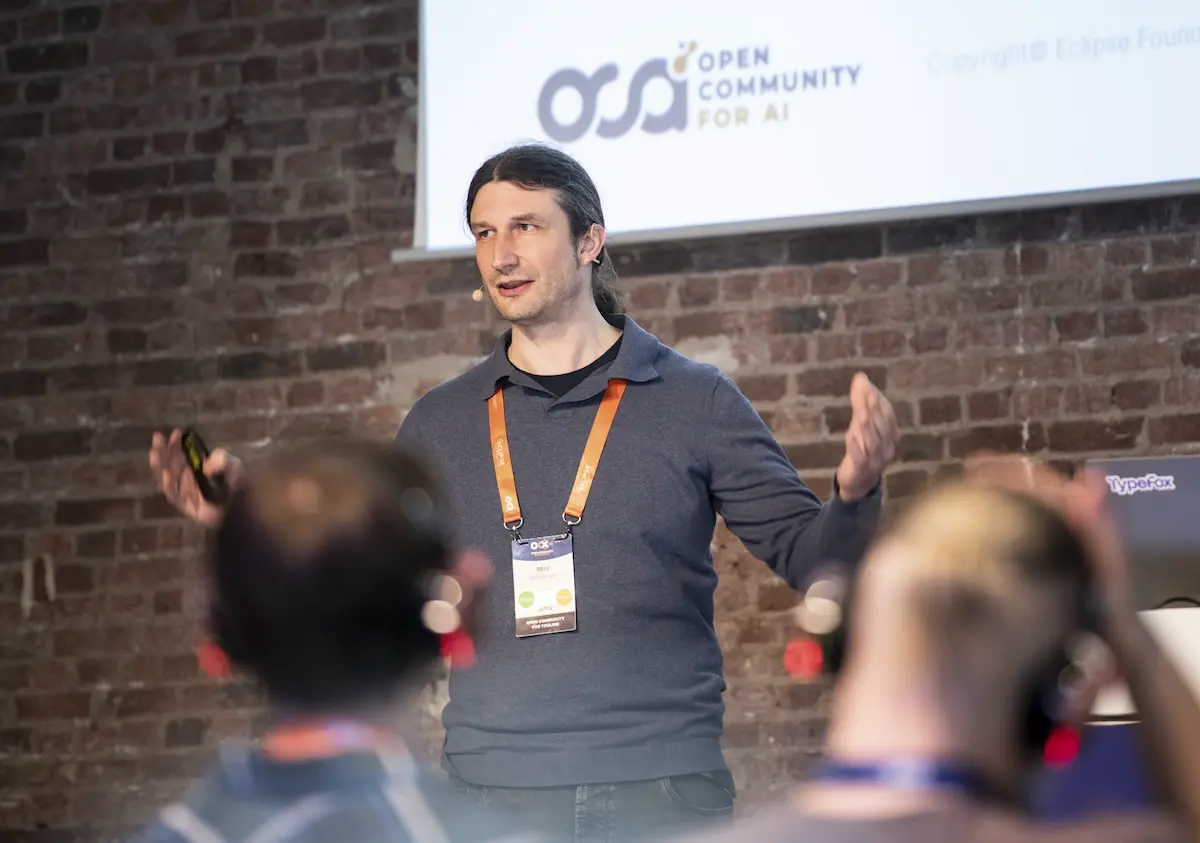
We’ve been really enjoying the kinds of problems we’ve been able to solve with Langium AI since we announced it last year. But it’s been quite a while since we released another big update, so we got around to doing just that! In case you’re not familiar with what Langium AI is, you can check out our introductory blog post on the topic. We were also recently at OCX 2026 to talk about Langium AI, where we got to share a ton of what we’ve learned over the last year (and at the very end mention what we’re going to talk about here in more detail).
After nearly a year of observations, a lot has changed with AI, agents, and software engineering overall. We’ve been changing with it, and we continue to do so. In particular, we’ve observed how CLI-based agents such as Claude Code, Codex, Gemini, OpenCode, and many more have jumped to the forefront of our minds since last year. The way we work with such tools is continually changing, but it’s abundantly clear these are incredibly useful tools.
With that being said, as incredible as the results can be, we’ve also seen our fair share of sub-par outcomes. This is particularly the case for DSLs, where novel syntax & semantics are often not present in the training data of an LLM. As many have noted (Microsoft for example) this is an outstanding problem. Still, the potential is clear, but wrangling agents successfully continues to be at the heart of the problem.
What’s new
To help rein in such agents for Langium-based engineering tasks, and evaluation of DSL-equipped agents, we’ve made three major changes to Langium AI:
-
We’ve added a Langium AI CLI that helps you get a Langium project set up with Langium AI. The focus is on being fast and simple to get evaluations up & running in just a few minutes.
-
A set of agent skills to help AI leverage the cli to its fullest potential, to get started with minimal friction, as well as to help users learn & understand the tooling for themselves.
-
A heavily revised evaluation suite in Langium AI Tools, to allow for evaluation to be performed structurally like tests but semantically like assessments (this is an adjustment to the existing package we’ve had for some time now).
If you’re short on time but your interest is piqued, check out the Langium AI CLI link first and flip through the README. Everything else can be set up from that point onwards.
So, what’s changed with all these additions then?
Now, effectively, you can do something like this to quickly & effortlessly set up langium-ai-tools in your own Langium projects (4.X and up).
# install the `lai` cli
npm install -g langium-ai

# installs langium-ai-tools, config & evals
lai init

# generate a mapping of your Langium project
lai gen descriptor

# generate a baseline system prompt using your mapping
lai gen sysprompt

# do a quick eval check
lai eval
By the way, none of this requires or uses AI so far, at this point it’s entirely programmatic. The CLI is intended to get you up and running with as minimal overhead as possible. This has been the largest friction point for us, and for others as well, and so effectively reducing this to a series of fast commands was a big focus. It’s a simple change from the user-perspective, but it makes it much easier to quickly set up & try Langium AI features and tooling without spending the extra time to wire it all up.
Agent Skills
Speaking of spending time, the addition of agent skills was done to directly reduce time & cognitive overhead even further. By providing a set of skills that range from general knowledge of Langium AI, to guided refinement of descriptors, system prompts, evaluations, and even Langium itself we can create a seamless experience where users can have an agent guide them effectively (or vice versa) for most LAI-related tasks.
Doing so is as easy as pulling the skills down directly, which can be done via Vercel Labs’ skills package on npm.
# easy way to install all of our skills
npx skills add eclipse-langium/langium-ai
Feel free to use your own skills manager if you have a preference, or to install them manually as well, the result will be the same.
A classic case where skills really shine is having existing documentation that describes what your use cases (and candidate evaluations) should be for your DSL; possibly something you’ve collected from users or in the field.
You can now use an agent equipped with the right skills (literally), and access to the lai cli, to handle the integration and reformulation of those cases as runnable evaluations.
Assuming you’ve done your homework, and the basis of your cases is clear and unambiguous, the results are typically very good.
We’ve even gone so far as to add a skill for building a DSL-specific skill, so a general-purpose agent can get a leg-up when working with your language’s novel syntax & semantics.
In fact, because a lot of what we’re doing here is revolving around evaluations, you can actually use the same approach in lai to evaluate the quality of your local agents with custom DSL skills.
It’s a bit meta, but it works just the same.
New evaluation system
Of course, for evals to be helpful, we needed a good system around that too.
Thankfully langium-ai-tools already provided such an evaluation system, but it was a bit clunky at times.
Often it felt like we were running regular tests, assuming one forgets the fact that we needed to get aggregate results, repeat runs more than once, and collect statistics about individual metrics within those runs.
What we really wanted was a dedicated evaluation utility that worked like regular tests (vitest, mocha, jest, etc.) but was focused just on evaluations.
That means averaging across multiple runs, supporting data collection, allowing heuristic checks, retaining history, and more.
So we wrote up a new evaluation API inside the existing langium-ai-tools to do just this, and incorporated the running logic into the lai cli too to make it easy to fire off.
The result is that you can now express evaluations in a familiar testing-like fashion like so in your evals folder:
// a partial example of an eval for a fictitious DSL that can express a bloom filter
describe('Basic Syntax Generation', () => {
    evaluation('bloom filter test', async (ctx: EvalContext) => {
        const prompt = 'Write a bloom filter in a MyDSL program';
        const response = await generateResponse(prompt, ...);
        // process & return a score plus some metadata
        // return a score between 0.0 - 1.0
        return { score, metadata };
    });
});
If you’re thinking this looks and feels like what you would be doing with vitest/jest/etc, it’s not by accident. We really liked the kind of structure we already use to compose, organize & run our tests. We just wanted it for evaluations instead. To be clear there are other evaluation solutions out there (excellent ones as well), but none so satisfying as just testing in TypeScript/JavaScript, so we focused around those ergonomics.
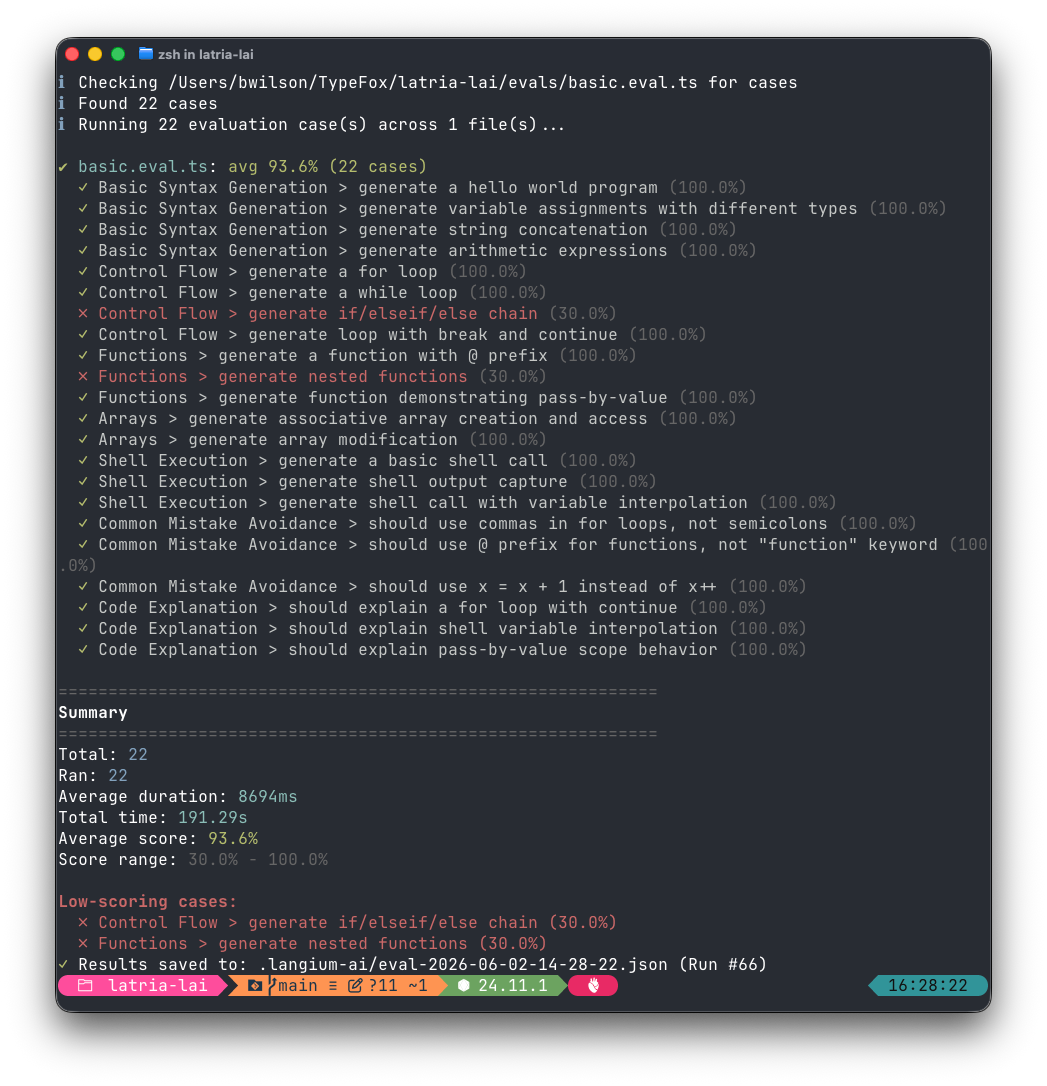
With all that aside, you can then run those evaluations with lai eval to get results:
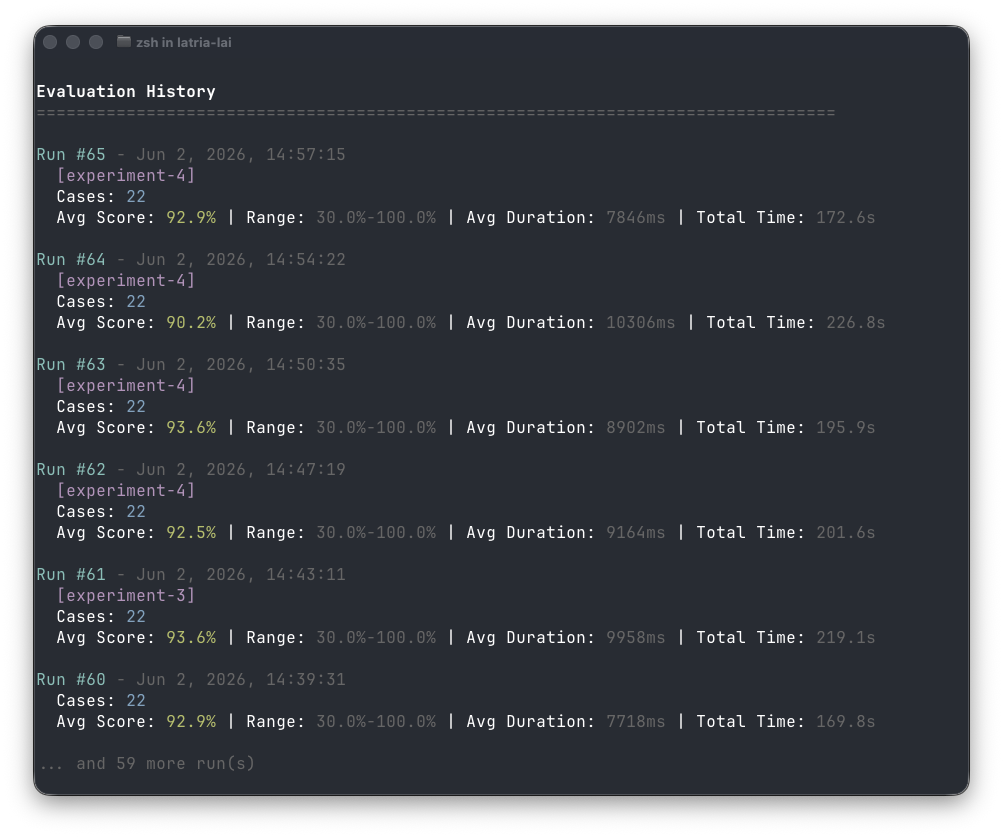
History is collected too, allowing for comparison between runs over time:
There’s a lot more utility in the cli as well, but already this makes for a really clean way to get Langium AI set up in a useful fashion, as opposed to how it was before. In practice, this has allowed us to do quick litmus tests to see how difficult it could be to start building a DSL-specific agent before investing considerable time or effort. This makes it much easier for us to do our job, save effort, and to have a better confidence in our results. And, in the spirit of how we do things at TypeFox, we believe this is best done transparently as open source. Ultimately, we’re always happy to share the work, but we’re also quite happy about the work as well.
Wrapping Up
If you’re interested in trying Langium AI out – or just curious about what it is – go check out the Langium AI GitHub page. You can also look directly at the agent skills we provide there to see how we’re automating various LAI tasks.
For using the tooling directly, you can check out langium-ai-tools and the langium-ai cli packages on npm.
We’d recommend first installing the lai cli as mentioned above, and using that as your starting point for setting everything else up.
If you run into a snag, or you’re short on time, go for the lai skill to help guide you along in the process.
We hope that these new additions & changes are helpful for the Langium community at large. We also plan to follow up with new information on evaluation techniques and practical application with Langium AI to extend upon this even further. In the meantime we look forward to seeing what you all build with these tools!
About the Author
Benjamin F. Wilson
Ben is an experienced engineer with a background in programming language theory & full-stack development. He previously co-founded his own software company, and has extensive experience leading projects. He's passionate about facilitating team success, & solving complex problems. In his spare time you can find him working on DIY things, electronics, & gardening.